Shadowkey Modern Mac and Windows Reimplementation
Hello Shadowkey fans,
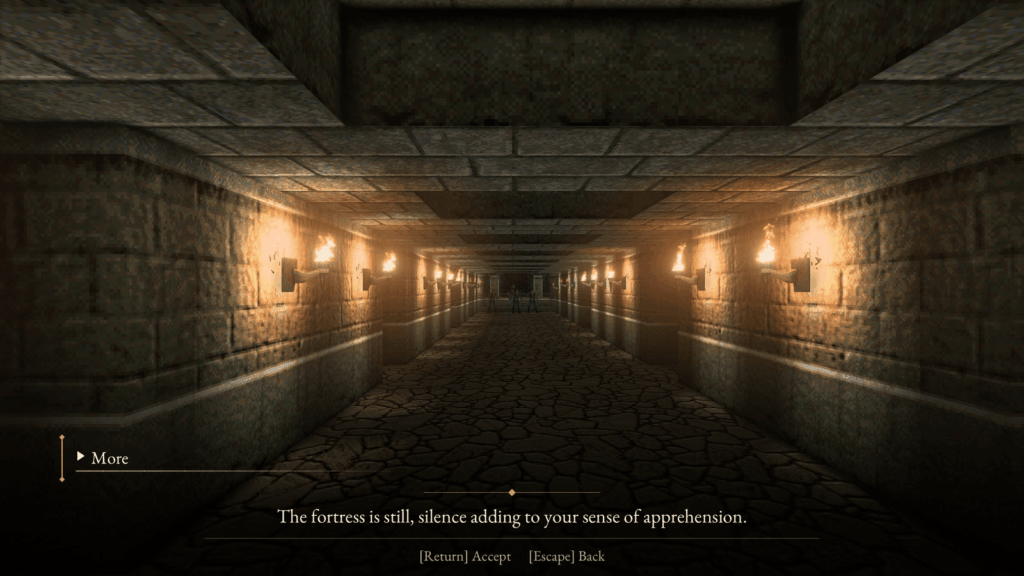
I’ve been working on a new engine for The Elder Scrolls Travels: Shadowkey, the 2004 N-Gage game. It’s called ‘Shadowkey Reforged’. It runs on Mac and I am working on a Windows version, but it isn’t released just yet (it will be available any day now – see footnotes).
I will be transparent from the outset that I am using AI to assist with this process.
In terms of the engine/reimplementation: No game data is included – it requires your own copy of the original N-Gage game files and runs the game’s original scripts, so all quests, dialogue etc are the original ones from 2004. With that aside, here’s what you can look forward to with Shadowkey Reforged:
Classic and Modern Experiences
When you start a new game you can choose between Classic or Modern mode:
Classic stays closest to the original. It plays in the N-Gage’s 176 × 208 portrait aspect ratio, with the original HUD, textures, weirdness, the original music and the original game logic. An optional ‘Original Pixels’ setting draws the game at the N-Gage’s real resolution.
Modern is my take on the game with a bunch of modern quality of life enhancements. Some of it borrows from later Elder Scrolls games:
- widescreen aspect ratio and new lighting effects
- a quest log with map and compass markers
- enemy health bars, and slightly more intelligent enemies that follow you through doors and search for you
- searchable barrels and crates, cabinets and grain sacks
- fall damage and sprint (which drains stamina)
- optional Morrowind soundtrack and sound effects, you can import if you own a copy of Morrowind
- improved hit detection on modern mode
plus there is so much more that wasn’t in the original game:
- Controller support (Xbox, DualShock and some third-party controllers) with remapping and rumble, as well as keyboard and mouse
- Up to 120fps
- torches, candles and fireplaces now have flames.
- enemies can now find a way down steps, or up them, to reach you.
- Windowed, Borderless and fullscreen options
- Eye Adaptation (Modern mode): players eyes adjust to the light, so dark corners stay dark and torch-lit areas are easy to see
- ‘fog of war’ added to the map, the local map reveals itself as the player explores
- Controller button icons for playstation and xbox
- in classic mode, you can play with the games original frame rate (on N-Gage) as a frame rate limit option
- High resolution menus, HUD, weapons and recreated boot screens
- Enemy HP hud element in modern mode
- HUD scaling options
- Render scale options
- Up to 4K supported with more updated artwork being added regularly
- ‘Miss’ indicator on screen when attacks don’t connect
- All six of the original languages are intact with localisation support for other languages soon
- A new cheats menu
- Fall damage in modern mode
- NPC’s whose quest is done walk away out of sight instead of vanishing in front of you (Modern)
- A small amount of screen shake on taking damage
- Option to skip the tutorial
- New reticle design
- Fast travel system similar to Skyrim and Oblivion
- Statistics / Kill count menu
- Improved reliability of interacting with doors and objects
- L3 toggles sprint on and off; it stops when you run out of stamina (Modern).
- Beautiful new dialogue boxes (inspired by Oblivion remastered)
- Flowing water and lava
- Fog and haze controls
- The game also automatically checks and downloads new engine updates (optional)
- and tons more, with new features and enhancements added daily.
How I’m making it
I’m a UX designer first and foremost, with some coding skills, but I’m doing this on my own. To make that possible I use AI tools throughout development, to help write and check the code and to help work out the original game’s file formats and rules. I review what goes in and all playtesting has been done by myself. (I understand that AI assisted development is off putting for some, and I completely understand if you prefer to skip this implementation of Shadowkey for that reason).
Some of the artwork has been recreated at a higher resolution, with a mix of AI tools and my own design work in Photoshop editing sprites, following the style of the original art as much as possible. I would love to have hand recreated artwork for all of the original assets eventually, but that will take a long time. Most of the artwork and textures are still on my to-do list and I’ll be updating the game as more artwork is completed.
Other ports including OpenShadowKey and the Godot port
I also want to mention OpenShadowKey by ItsJustBshawn. It’s an open-source PC engine for Shadowkey with a public Windows alpha, and it’s good work that’s worth a look. There is also a project to rebuild Shadowkey in Godot – but these projects appear to be quiet at least for now.
Shadowkey Reforged is not meant to be a replacement for either of them. It’s a separate project with different goals. i.e: it is my own take on a modern version of the game, with a Classic mode for purists who wants to keep the game close to the original.
Links and the small print
- Website, with screenshots, side-by-side comparisons with the original, and a log of changes: https://shadowkey.omracreative.ie
- Multiplayer features is not currently supported
- The bow weapon is kind of broken right now – it works (and also has L2 to draw and hold while aiming – but the original weapon sprite needs updating to support this)
- It will be free .. it’s an unofficial fan project, not affiliated with or endorsed by Bethesda, ZeniMax, Microsoft, Nokia or Vir2L.
- There’s no release date just yet. but it’s imminent! I’m playing through the whole game and fixing bugs as I go. I have opened a feedback board on the landing page above, which will be the main channel for bug reports and suggestions but I’m happy to answer any questions here in the meantime.
- If you are interested in testing please let me know.
- Join the N-Gage discord and drop by the #research channel to follow along with updates and progress. https://discord.gg/fVv2SXYu5